Learning coding is like learning a new language. It requires patience, consistency, and regular practice. Don't worry if you make mistakes—every programmer starts as a beginner. The best way to learn coding is by building small projects and practicing every day.
Step 1: Understand What Coding Is
Coding is the process of writing instructions that tell a computer what to do. These instructions are written using programming languages, allowing computers to perform different tasks automatically.
With coding, you can create:
- Websites
- Mobile Applications
- Desktop Software
- Games
- Artificial Intelligence Applications
- Automation Tools
- Business Software
- E-commerce Websites
- School Management Systems
- Billing Software
Step 2: Learn HTML (HyperText Markup Language)
HTML is the first language every web developer should learn. It is the foundation of every website and is used to create the structure of web pages.
Using HTML, you can create:
- Headings
- Paragraphs
- Images
- Videos
- Hyperlinks
- Tables
- Forms
- Buttons
- Lists
Without HTML, a website cannot exist because it provides the basic structure that browsers display.
Step 3: Learn CSS (Cascading Style Sheets)
Once you've learned HTML, the next step is CSS. CSS is used to style and design web pages.
CSS helps you:
- Add colors
- Change fonts
- Adjust spacing
- Create layouts
- Add animations
- Create responsive websites
- Design buttons and cards
- Improve the overall appearance of a webpage
Without CSS, websites would appear plain and unattractive.
Step 4: Learn JavaScript
JavaScript makes websites interactive and dynamic. It allows users to interact with web pages instead of simply viewing them.
JavaScript is commonly used for:
- Form Validation
- Image Sliders
- Popup Messages
- Calculators
- Dynamic Menus
- Games
- API Integration
- Live Search
- Interactive Web Applications
JavaScript brings life to your website by responding to user actions.
Step 5: Practice Every Day
Coding is a practical skill, and the more you practice, the better you become. Reading tutorials alone isn't enough—you need hands-on experience.
Try to practice coding for at least 30–60 minutes every day.
Begin with simple projects such as:
- Personal Profile Page
- Login Form
- Registration Form
- Calculator
- Image Gallery
- Portfolio Website
Each project will help strengthen your understanding of programming concepts.
Step 6: Learn Responsive Web Design
Today, websites are viewed on desktops, laptops, tablets, and smartphones. A responsive website automatically adjusts to different screen sizes, ensuring a great user experience on any device.
Important topics to learn include:
- Flexbox
- CSS Grid
- Media Queries
These tools help create modern, mobile-friendly websites.
Step 7: Learn Bootstrap
Bootstrap is a popular CSS framework that helps developers build responsive websites more quickly.
With Bootstrap, you can easily create:
- Navigation Bars
- Buttons
- Cards
- Forms
- Carousels
- Modals
- Responsive Layouts
- Image Galleries
Bootstrap reduces development time by providing ready-to-use components.
Step 8: Learn Git & GitHub
Git is a version control system, and GitHub is an online platform where developers store and manage their code.
Benefits of Git and GitHub:
- Track changes in your code
- Backup your projects
- Collaborate with other developers
- Showcase your work through a professional portfolio
Learning Git and GitHub is essential for modern software development.
Step 9: Learn Backend Development
After mastering HTML, CSS, and JavaScript, the next step is backend development. The backend handles data processing, databases, authentication, and server-side logic.
Popular backend technologies include:
- PHP
- Python
- Node.js
- Java
- C#
If you choose PHP, learn the following topics:
- Variables
- Data Types
- Operators
- Conditional Statements
- Loops
- Functions
- Arrays
- Forms
- Sessions
- Cookies
- File Upload
- Email Sending
- MySQL Database
- CRUD Operations
- Authentication
- REST APIs
Backend development enables you to create fully functional web applications.
Step 10: Learn MySQL Database
Most websites need to store information, such as user accounts, products, or orders. MySQL is one of the most popular database systems for web development.
Learn how to:
- Create Databases
- Create Tables
- Insert Records
- Update Records
- Delete Records
- Search Data
- Connect MySQL with PHP
Understanding databases is a key part of becoming a full-stack web developer.
Step 11: Build Real Projects
Projects are the best way to apply what you've learned and gain practical experience.
Start with beginner-friendly projects such as:
- Personal Portfolio Website
- Calculator
- To-Do List
- Login & Registration System
- Student Management System
- Library Management System
- Billing Software
- Inventory Management System
- E-commerce Website
- Food Ordering System
- Job Portal
- School ERP
Each project will improve your problem-solving skills and confidence.
Step 12: Deploy Your Website
After building your projects, publish them online so others can access them.
Deployment teaches you how to:
- Purchase a Domain Name
- Buy Web Hosting
- Upload Files
- Connect a Database
- Install SSL Certificates
- Make Your Website Live
Having live projects also strengthens your portfolio.
Step 13: Keep Learning
Technology changes rapidly, so continuous learning is essential.
After mastering the basics, explore advanced topics such as:
- Object-Oriented Programming (OOP)
- APIs
- AJAX
- JSON
- jQuery
- Laravel
- React
- Vue.js
- Next.js
- Node.js
- Artificial Intelligence
- Cloud Computing
- Cyber Security
The more you learn, the more opportunities you'll have.
Complete Coding Roadmap
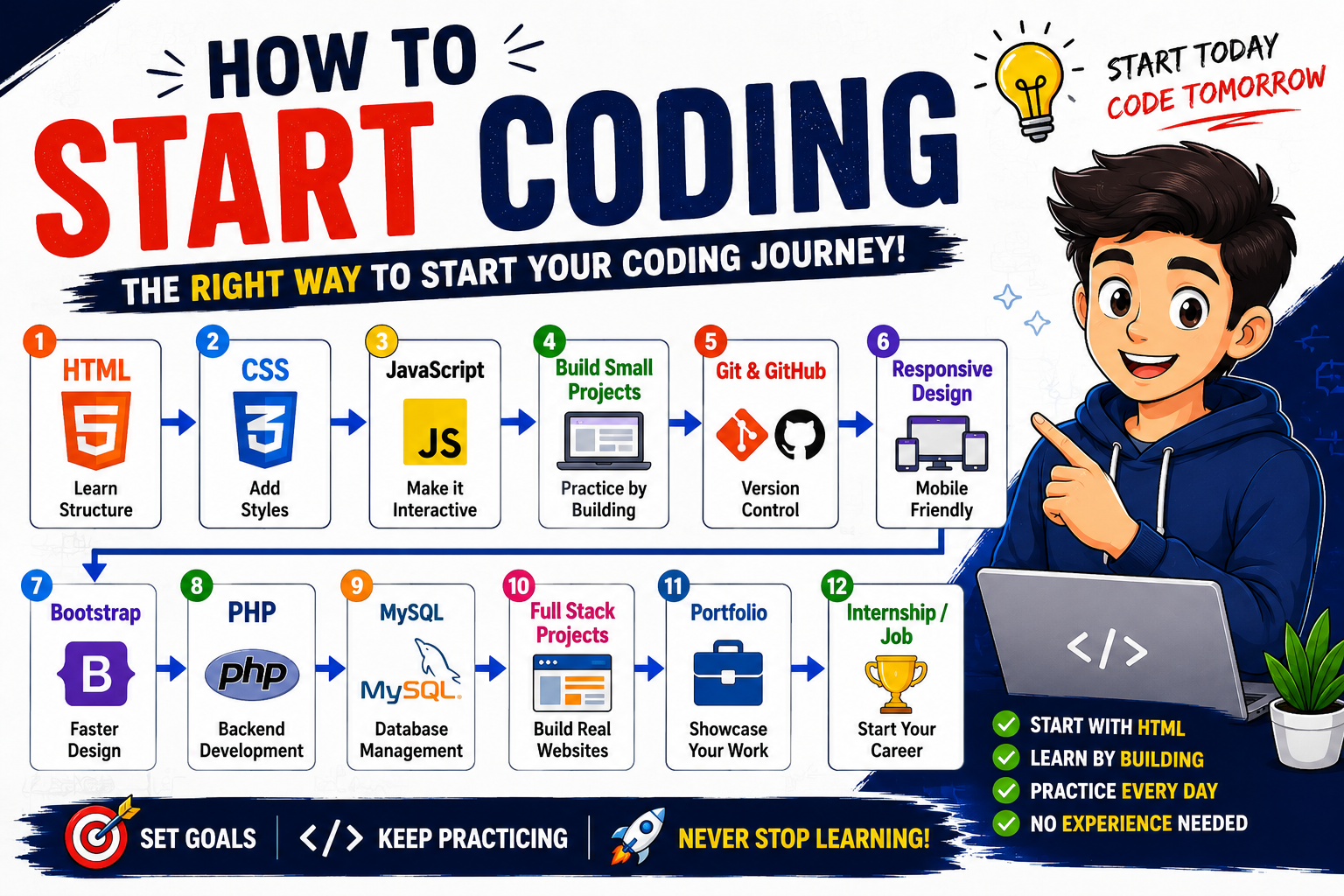
Start Learning → HTML → CSS → JavaScript → Responsive Design → Bootstrap → Git & GitHub → Backend (PHP) → MySQL → CRUD Operations → Authentication → REST APIs → Build Real Projects → Deploy Websites → Internship → Freelancing → Full-Time Job
Recommended Free Tools
- Visual Studio Code – Code Editor
- Google Chrome – Web Browser
- WAMP / XAMPP / Laragon – Local Server for PHP
- Git – Version Control
- GitHub – Online Code Repository
- MySQL – Database Management System
Tips for Beginners
- Learn one topic at a time.
- Practice coding every day.
- Don't memorize everything—understand the concepts.
- Build projects after each new topic.
- Learn by fixing your own mistakes.
- Read and understand other developers' code.
- Be patient and stay consistent.
- Keep improving your projects.
- Never stop learning.
Conclusion
Coding is a journey that begins with the basics and grows through consistent practice. Start with HTML to build the structure of a webpage, learn CSS to design it, and use JavaScript to make it interactive. Once you're comfortable with frontend development, move on to backend technologies like PHP and MySQL to create dynamic web applications. Build real-world projects, publish them online, and continue learning new technologies. With dedication and regular practice, you can become a skilled web developer and open doors to internships, freelancing opportunities, and a successful career in software development.